Car rental management software

Run your rental agency without spreadsheet chaos.

Manage your car rental reservations, customer records and vehicle availability in one place. Runnable Fleet helps independent agencies organise their daily work, whether they rent cars, scooters or motorbikes.

Start with the essentials. Add more structure when the agency needs it.

Easy setup

Guided first steps

Daily planning

Pickups and returns

Any fleet

Cars, scooters and bikes

Today at the rental desk

One clear operating view

Live plan

Pending approval

R-26-4L8KQX

New

Period

14 Jul, 09:30 to 18 Jul, 19:00

Pickup

Airport arrivals

Confirm Open details Decline

Pickup today

4

Return today

3

Active rentals

11

Made for the rental desk

The essential records stay connected.

A reservation is easier to manage when the customer, vehicle, dates, locations, price, and communication belong to the same record.

01

Vehicles and categories

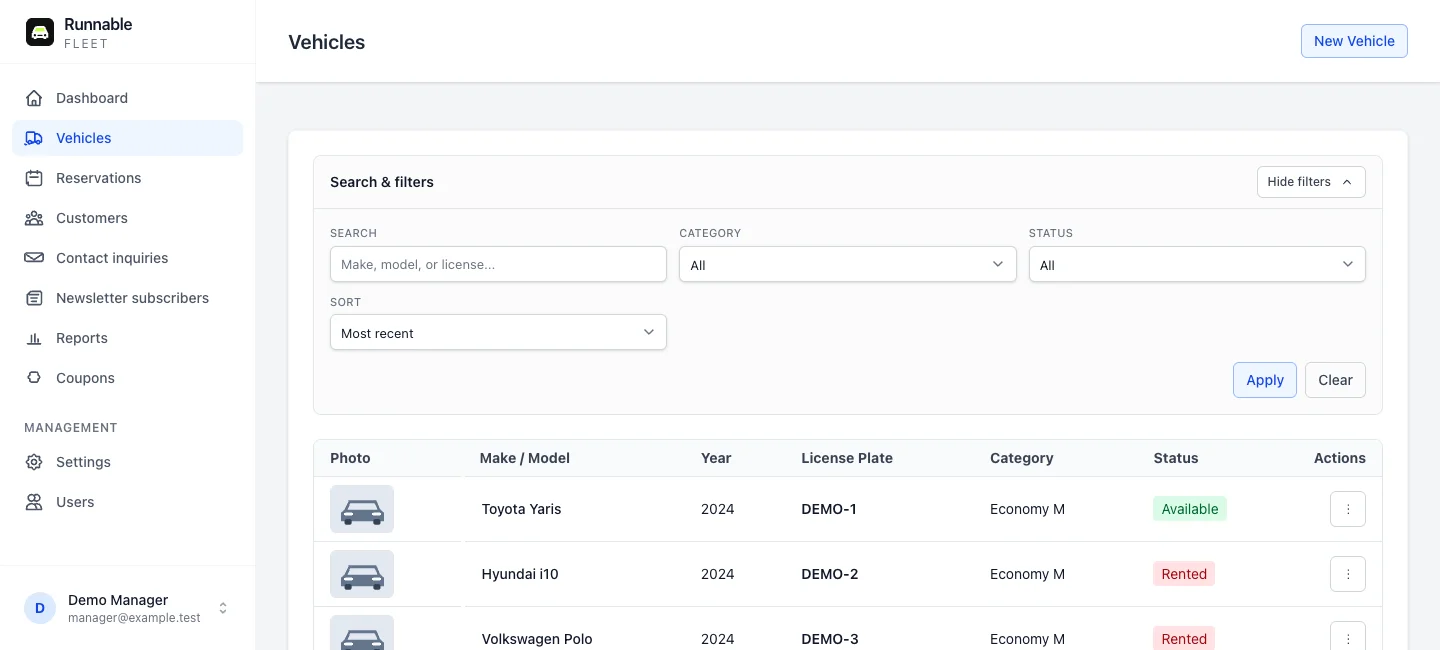
Keep vehicle photos, registration numbers, categories and status together. Organise cars, scooters and motorbikes using the categories your agency needs.
02

Reservations

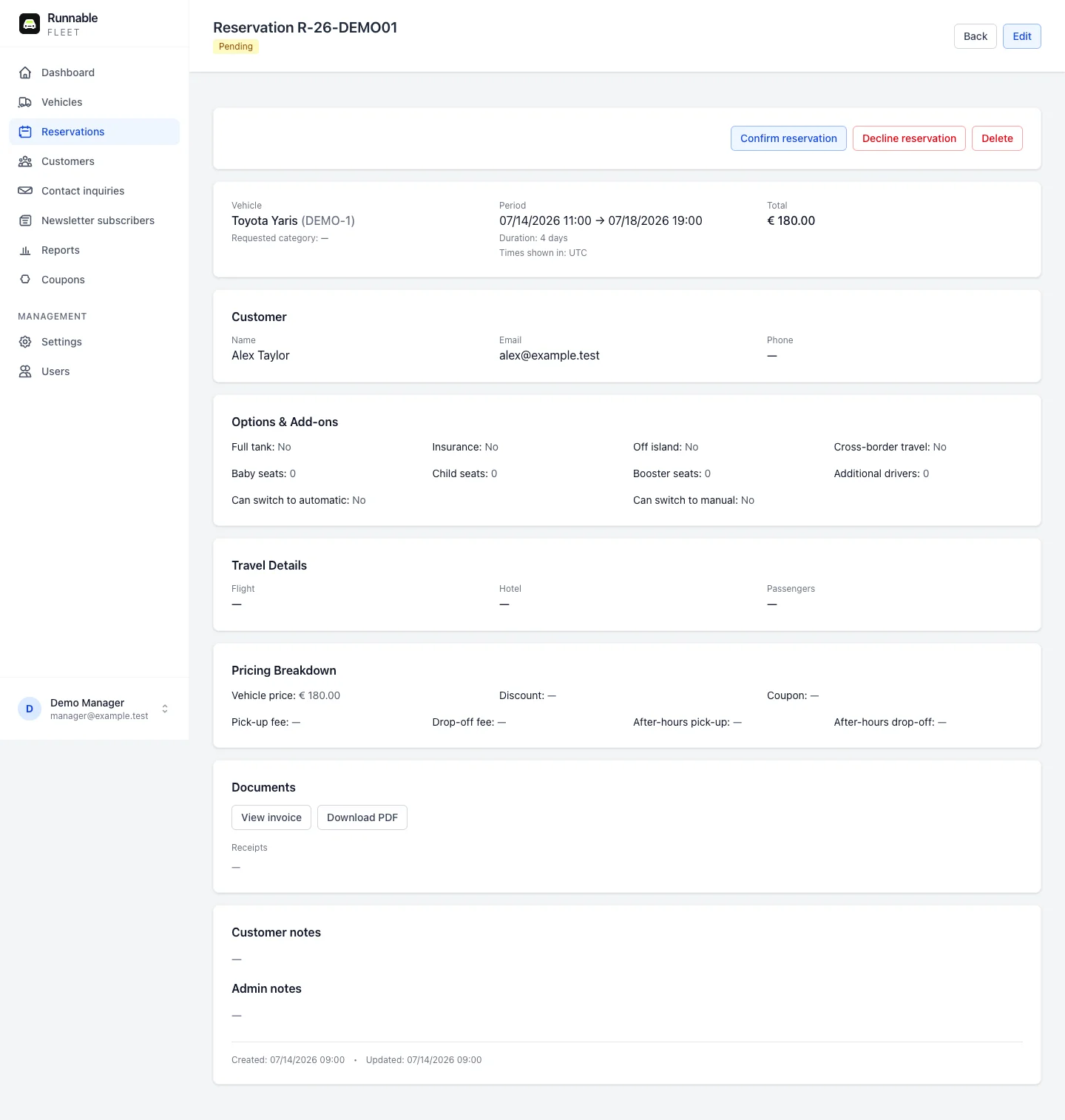
Record rental dates, pickup and return locations, customer details and charges together. Review pending reservations and follow each rental through to completion.

03

Customers

Enter customer details while creating a reservation and find their rental history later. Keep contact details and past reservations together instead of searching separate lists.

04

Daily planning

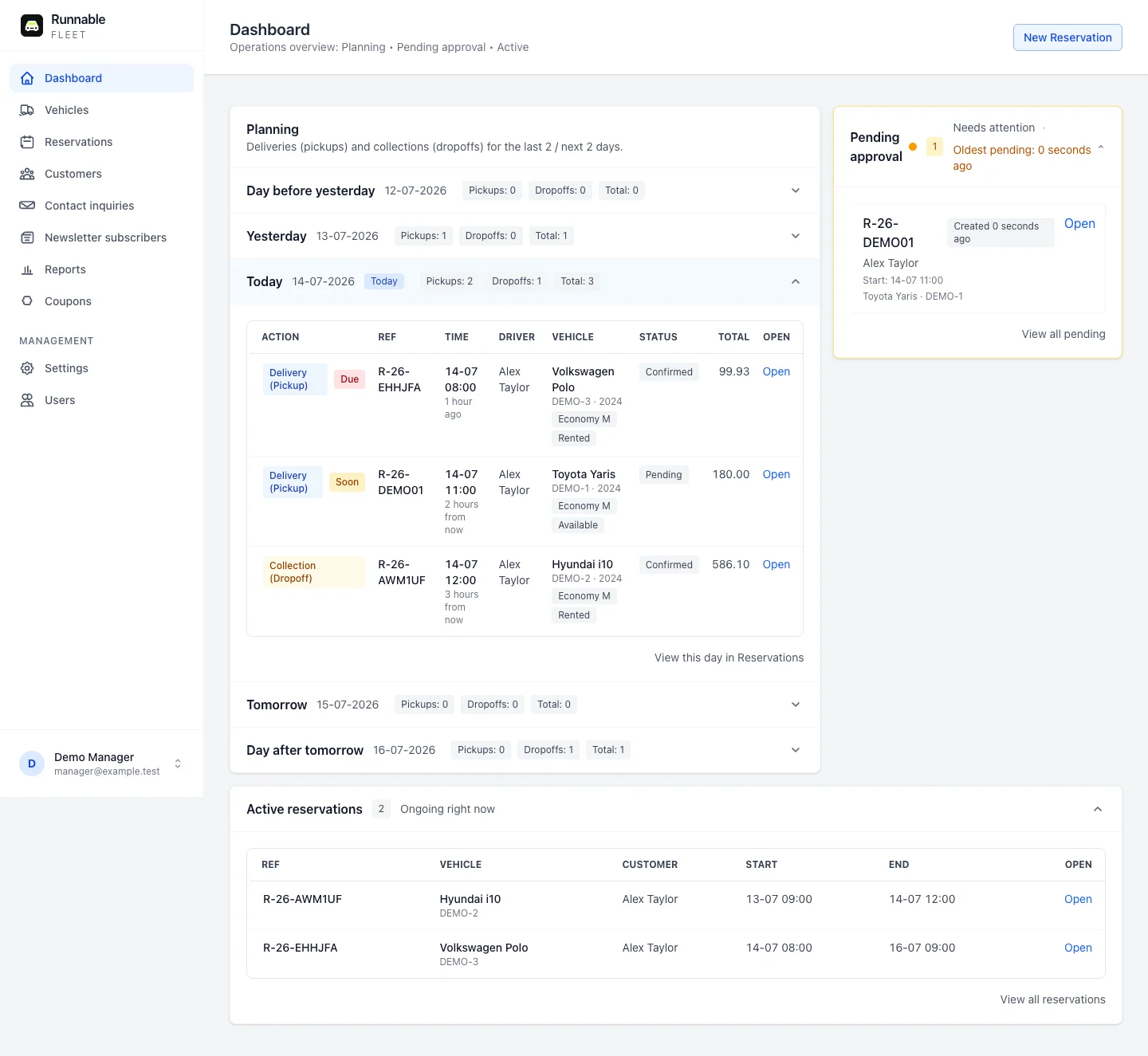
See which vehicles are going out, which are coming back and which rentals are active. Use the dashboard and reservation calendar to plan the day ahead.

05

Pricing and service rules

Grow into seasonal rates, add-ons, discounts, locations, and service surcharges when needed.

06

Clear communication

Keep confirmations, updates, reminders, contact enquiries, and internal notes organised.

Inside the application

See how the rental day comes together.

Three views for the work you handle every day: planning rentals, checking reservation details and keeping your fleet organised.

01

Know what needs attention today

Review pending reservations, upcoming pickups, returns and active rentals from the daily overview.

Fleet dashboard showing pending reservations, planning and active rentals for Demo Rentals
02

Keep the rental details together

Check the customer, vehicle, rental period and charges in one record. Confirm or decline a pending reservation without editing the whole form.

Fleet reservation detail page showing a fictional customer, vehicle, rental dates and approval actions
03

Find the right vehicle quickly

Browse your fleet and filter by category or status. Open a vehicle to review its details and manage its photos.

Fleet vehicle list showing three demo vehicles with categories and status filters

Actual application screens with fictional demo records. Screens are shown in English; Fleet also supports Greek. Features depend on your plan.

A practical first run

Start recording real work in a few clear steps.

There is no long implementation project before the workspace becomes useful.

  1. 01 01

    Create the agency workspace

    Set the agency name, timezone, and currency so dates and amounts are consistent.

  2. 02 02

    Add the vehicles you rent

    Record the fleet and the categories the agency actually offers.

  3. 03 03

    Create the first reservation

    Add the customer as part of the reservation and keep every detail in one place.

Built from real rental work

Not a generic CRM adapted with rental labels.

Fleet follows the decisions a rental desk makes every day: which vehicle is available, what starts or ends today, what the customer requested, and what still needs approval.

  • ✓ Reservation-focused dashboard and calendar
  • ✓ Agency-specific users, settings, and records
  • ✓ Localised dates, locations, and customer communication
  • ✓ A foundation that can support online booking later

A live example

Discover Rent A Car uses Fleet behind its booking journey.

The same operational foundation can later connect with a custom agency website when the business is ready for that step.

View the Runnable Fleet overview

Start at the right size

Useful for a small agency today. Ready for a more connected operation tomorrow.

Begin with manual customer and reservation records. The workspace can expand into planning, pricing, service locations, communication, and website-connected bookings without moving the core records elsewhere.

  • 01 Replace scattered spreadsheets, calendars, and message threads.
  • 02 Give the agency team one shared view of reservations and vehicles.
  • 03 Keep the first setup simple instead of configuring features you do not need yet.

Choose the tools you need

Start with Basic. Expand when you need more.

New agency accounts start on Basic for manual vehicle, customer and reservation records. You do not need a website or an integration to get started.

Basic

Free

The essentials for recording your daily rentals.

  • Up to 10 vehicles
  • Up to 2 users, including the agency admin
  • Vehicle, customer and reservation records
  • Daily dashboard with pickups and returns
  • Manual reservation entry

Pro

€60 / year

Equivalent to €5 / month, billed annually.

More room for your fleet and team.

  • No plan limit on vehicles
  • No plan limit on agency users
  • Everything in Basic
  • Reservation calendar

Ultra

Contact us

A tailored package for agencies with a website built by Runnable.

  • No plan limit on vehicles
  • No plan limit on agency users
  • Everything in Pro
  • Website-connected bookings
  • Seasonal pricing, add-ons and coupons
  • Service locations and arrival confirmation emails
  • Printable billing documents

Contact Runnable to activate Pro with annual invoicing or discuss an Ultra package. Website creation, hosting, maintenance and support are quoted separately. Creating an account starts you on the free Basic plan, with no automatic paid subscription.

Paid plan prices exclude VAT, where applicable.

Website integration is an optional later step, arranged and managed by Runnable when we build your agency website.

Common questions

A straightforward starting point for an independent agency.

Can Fleet replace my rental spreadsheets?

Fleet brings vehicle records, customer details and reservations into one shared application. You can record each new rental there and use the dashboard and calendar for daily planning, instead of updating separate spreadsheets.

Do I need to install software?

No. Fleet runs in your web browser with an internet connection. Sign in to your agency account to access your records, without installing a desktop application.

Can I use Fleet without an agency website?

Yes. Fleet works as a standalone back office where you can record vehicles, customers, and reservations manually.

Do I have to create customers separately?

No. Customer information can be entered while creating a reservation, so the customer record and reservation history stay connected.

Does Fleet only support cars?

No. The fleet can include cars, scooters, motorbikes, and other rentable vehicle types.

Can more than one person use the agency workspace?

Yes. The application supports separate agency users so the team can work with the same operational records.

Can it support pricing and online bookings later?

Yes. More advanced agency plans can add seasonal pricing, locations, add-ons, communication, and a custom website booking connection.

Who builds and supports Runnable Fleet?

Fleet is a product by Runnable, a web and software studio building practical systems for small businesses since 2015.

Ready for a cleaner rental desk?

Create the workspace and add your first vehicle.

Start with the records your agency already handles every day. You can decide what to add next after the basics are organised.